

Start with research questions
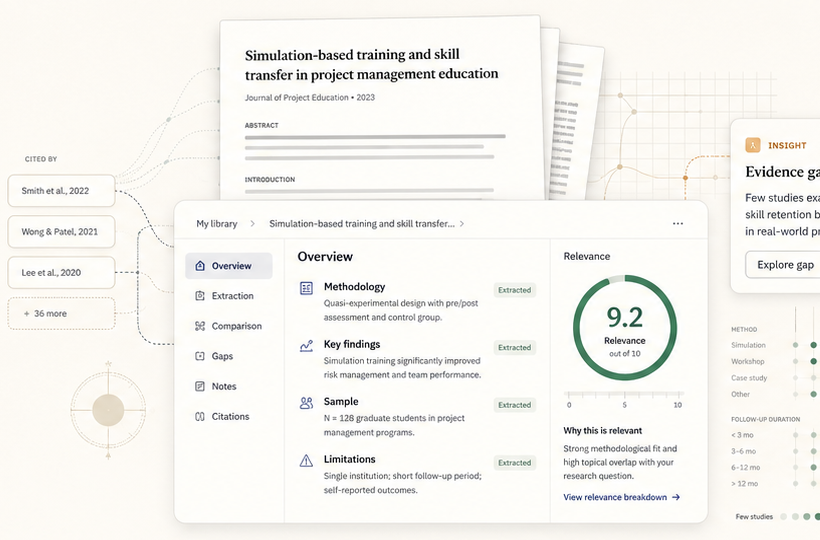
Create a project folder, add questions one by one, and let Litmus extract keywords that guide relevance scoring.
Litmus is an AI-assisted literature review workspace for researchers and students. It helps users create project folders, add research questions, generate editable keywords, upload research papers, score paper relevance, annotate PDFs, write review notes, collaborate with research partners, and prepare evidence for synthesis and academic writing.
Litmus helps researchers and students organize papers, define research questions, extract useful keywords, score relevance, highlight evidence, write notes, and collaborate without losing context.
Create a project folder, add questions one by one, and let Litmus extract keywords that guide relevance scoring.

Upload PDFs into the right project so each paper is evaluated against the same research focus.

Highlight selected text, add sticky-note comments, change highlight color, and preserve notes on the page.

Use structured records, review notes, highlights, and AI-assisted insights to compare findings across papers.
Litmus brings your reading list, project questions, relevance keywords, paper notes, PDF highlights, AI-assisted insights, and collaborator discussions into one organized research workspace.
Create folders around topics, modules, theses, or review projects. Add research questions and keywords so papers are evaluated in the right context.
The internal reader supports zoom, print, fullscreen, right-click highlighting, sticky-note icons, note popups, and persistent highlight colors.

Mention collaborators from notes, see shared highlights, and keep research conversations connected to the source paper.
Litmus supports the work researchers actually do: define the question, gather papers, check relevance, read closely, capture evidence, compare findings, and prepare synthesis.
Add research questions first, then let Litmus extract keywords that become the relevance lens for uploaded papers.
Select text, highlight it, add notes, edit colors, and preserve your reasoning beside the source itself.
Use notes, reviews, highlights, and AI-assisted insights to move from reading individual papers to seeing patterns across studies.
Litmus is designed for solo study and team-based review: everyone can read, annotate, write notes, compare evidence, and keep the project organized around the same research goals.
Litmus helps you shape a project before uploading papers, so the workspace understands what your review is trying to find.
Individual reviews
Each collaborator can write their own review while the project keeps paper-level context, highlights, and extracted evidence intact.
 Shared annotations
Highlights and PDF notes stay visible to the project group, making it easier to compare interpretation and avoid missed evidence.
Research-ready exports
Keep structured evidence ready for comparison, synthesis, reporting, supervision meetings, and writing sessions.
Shared annotations
Highlights and PDF notes stay visible to the project group, making it easier to compare interpretation and avoid missed evidence.
Research-ready exports
Keep structured evidence ready for comparison, synthesis, reporting, supervision meetings, and writing sessions.
Litmus supports students, thesis writers, supervisors, research assistants, lab groups, and review teams who need a better way to organize academic reading.
Use project folders, research questions, and relevance scoring to understand which papers belong in the review.
Capture findings, gaps, methods, and notes in a structured workspace that supports synthesis.
Highlight selected text, attach notes, and return to the exact paper context when drafting chapters or related work.
Keep PDFs, annotations, comments, and review notes organized around a shared question.
Reader initials show who is working on each paper so teams avoid duplicated effort and know where attention is focused.
Litmus is designed for the point where reading, note-taking, relevance decisions, collaboration, and synthesis all need to stay connected.
Each project starts with research questions. Litmus extracts keywords from those questions and uses them to keep paper relevance tied to the purpose of the review.
Yes. Students can organize papers by topic, highlight PDF evidence, write review notes, and return to saved evidence when drafting chapters, reports, or presentations.
Research partners can work in shared projects, mention each other inside notes, see shared annotations, and keep discussions connected to specific papers and passages.
Create a project, define your research questions, upload papers, score relevance, read PDFs internally, annotate evidence, and build a clearer path toward writing.